Wednesday, October 19, 2011


Why I Dumped My iPhone—And I'm Not Going Back

  • October 4, 2011 • 5:30 am PDT
  • 903 responses
iPhone 4
On Black Friday in 2009, I said goodbye to my iPhone. And when Steve Jobs’ successor announces the newest version today, I’m going to ignore the whole spectacle. Or try to, anyway.
In 2007 I was one of those people who obsessively monitored MacRumors.com for iPhone scuttlebutt, then waited in line for hours and bought one the first day it came out. At the time, I was working on Barack Obama’s digital campaign team in Chicago, and I was wide-eyed about the iPhone’s potential to empower the grassroots. A volunteer, I imagined, could pull up a map and find five doors of likely voters to knock on; or share streaming videos of Obama speeches at local diners and farmers markets—or even collect credit card donations at rallies. It would be easier than ever to change the world.
Indeed, the iPhone changed my life. Before I got my iPhone, rushing to the airport was a harrowing experience; after, it was actually kind of fun. I could check in en route to my flight and instantly get my boarding pass, use the extra half hour to find a cheap but critically-lauded Mexican place in my destination city. I was never bored. Whenever I came to a red light or a long line, I reflexively reached for my iPhone. The Terminal 3 waiting area became the most interesting place in the world.
I could easily spend three straight hours on my phone without even noticing. If I’d spent three straight hours watching TV, I would be disgusted with myself. But I was convinced that the Internet was more edifying than television—even though most of my online diet consisted of gossipy garbage—because it was “interactive.” I couldn’t possibly be a zombie, because everyone knows zombies don’t comment and share.
Yet it was nearly impossible for me to sit through dinner without reaching for my iPhone. Even when my wife was in the middle of telling me something important, I couldn’t resist peeking at that tiny screen under the table to find out whether a high school acquaintance liked my latest status update. “What is so important?” she demanded, and I knew I had no good answer.
Soon after another iPhone-related argument, I traveled to Turkey to give a presentation about my experiences on the Obama campaign and about how tools like the iPhone could be used to build a movement. But for all my talk about the liberating power of technology, I was beginning to see how imprisoned I was by it . On the long flight home, my iPhone on airplane mode, I began reading Henry David Thoreau’s Walden. It was one of several dozen classics that I’d downloaded for free in a fit of literary quixotism, then ignored.
I was almost embarrassed by the degree to which Walden felt directed toward me. I was particularly stung by his withering take on news junkies: “Hardly a man takes a half-hour's nap after dinner, but when he wakes he holds up his head and asks, ‘What's the news?’ as if the rest of mankind had stood his sentinels ... Pray tell me anything new that has happened to a man anywhere on this globe,” he wrote in 1854.
And when I came across his famous verdict—“Men have become tools of their tools”—I felt like an enormous tool.
The next morning, I was in Boston with my family for Thanksgiving. Jetlagged and jarred by Thoreau, I woke up at 5 a.m. I got a bike out of my parent’s basement, took out my iPhone, and looked up directions to Walden Pond.
When I arrived, I read Walden’s most celebrated lines: “I went to the woods because I wished to live deliberately, to front only the essential facts of life.” I thought about how it’s become fashionable to pooh-pooh Thoreau as a weak-willed hypocrite who lived a short walk away from civilization and had his mother deliver food to his doorstep. Many of these Thoreau skeptics dismiss critics of technology as curmudgeonly alarmists. Of course, I was one of those people.
I read on: “I wanted to live deep and suck out all the marrow of life, to live so sturdily and Spartan-like as to put to rout all that was not life...”
No matter how impure Thoreau’s experiment in simple living may have been, there was something undeniable in his suggestion that we often have to strip convenience from our lives to feel alive. The iPhone had certainly made my life easier, but had it made my life better?
First thing the next morning, I went to the AT&T store. I had to explain several times that I didn’t want to trade my iPhone in for a newer model, or a Droid, or anything with the Internet. I just wanted something that would allow me to make calls. The sales clerk looked at me with an expression that read: “Who gets something worse on Black Friday?” I walked out with a ridiculously unsleek '90s-era Nokia that my friends still tease me about.
Since then, I haven’t become a Renaissance man or a soulful motorcycle mechanic, but my daily life has improved. Commutes are no longer opportunities to catch up on email or Twitter, so I’m reading books again. It feels a little like getting a new contact lens prescription: Things that were blurred together feel sharper and more distinctly colored. And of course, I’m no longer engaged in half-conversations with the people in front of me and half-conversations with the Internet.
There are, of course, inconveniences. I had to buy a printer for my boarding passes. I hand-write driving directions or text them to myself. If I’m in an unfamiliar neighborhood or a new city, I actually have to do some planning before I bolt out the door. And when I get lost and am too embarrassed to ask a stranger, I have to call my wife, who has an iPhone, for directions.
One of the hardest things to get used to was being unable to instantly share my awesome and horrible experiences with my friends online. Now, I write down my impressions in a notebook, and by the time I get back to a computer, they rarely feel like must-tweets. I’m forced to slog through the tedium of waiting, to wrestle with dull passages and slow scenes, to grapple with confusing and sometimes scary situations on my own. I’m able to savor an idea and allow it to gestate.
When I had an iPhone, the Internet was no longer a destination; it was on me every day, like a piece of clothing I put on first thing in the morning. When I get tempted to return to that life, I ask myself: Do I really want the Internet to be something I feel naked without?  
I still covet the thinner, faster, lighter iPhone 5. But I’m sticking with my boring little Nokia.

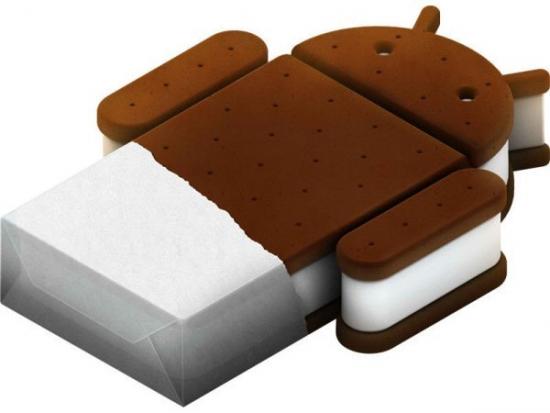
Android 4.0 Ice Cream Sandwich: everything you need to know Updated: The lowdown on the new version of Android MOBILE COMPUTING NEWSBy Dan Grabham


Google dropped some interesting information about Ice Cream Sandwich, the next version of Android - Android 4.0 at its Google I/O conference back n May.
We now know that Android 4.0 Ice Cream Sandwich will be announced at a Google event on 19 October.
A video of an Ice Cream Sandwich sculpture at Google's HQ confirms the 19 October launch for the new OS.
And now we've done our own video of what we think the new OS will pack - check it out below:
The Android 4.0 launch takes place at 10AM Hong Kong time (3AM UK time), and was posted on Google's brand new @Android Twitter account.
The Samsung-built 4.7-inch, 1.5GHz dual-core Nexus Prime is the likely partner handset, but we don't know a Nexus Prime UK release date as yet.
As we reported from Google's keynote at Mobile World Congress in February, Google's mantra for the Android 4.0 OS is "one OS everywhere" – it will be a single 4.0 version of Android running across phones and tablets, unlikeAndroid 3.0 Honeycomb that only runs on tablets.
That's why it's a Sandwich y'see.
Android 4.0 Ice Cream Sandwich interface
Ice Cream Sandwich will bring all the interface loveliness of Android 3.0 Honeycombto Android smartphones. Android phone users will get the updated app launcher, holographic user interface, interactive and new homescreen widgets plus the multi-tasking panel.
Android 3.0 honeycomb
ANDROID 3.0: This interface magic will be coming to Android Ice Cream Sandwich
On 12 August we saw a batch of leaked screenshots of Ice Cream Sandwich.
Android Police and Roots Wiki seem to have come up with an odd cross-site team up to leak four pretty plausible screengrabs of the latest version of Google's mobile OS, which will likely be Android 4.0.
Android 4.0 Ice Cream Sandwich features
Google says Ice Cream Sandwich is its "most ambitious release to date" and will incorporate all the best bits of Honeycomb, the Android tablet OS, and make them useable on smartphones too.
But Ice Cream Sandwich is about more than just the user interface and it will bring all the new Android 3.1 features to phones. This new update means Android tablets will also be able to act as a USB hub and you'll be to hook up devices such as mice and keyboards and game controllers to tablets and smartphones.
On 10 October, TI refused to confirm or denyFudzilla reportsthat it was the reference design for Android 4.0 would be based on their hardware.
Google is also intending to make life easier for developers by releasing a new set of APIs that will help them to scale their apps across the various sizes of Android devices - Google acknowledges that it's important for developers to be able to design apps that will work across 3.5-inch smartphones up to 10.1-inch tablets.
During the Google Google I/O keynote those on stage also showed off 3D headtracking using the front-mounted camera so you can figure out who is speaking and focus on them while on a video call. Face detection will be a key feature in the OS and we hear that you can even unlock your handsetusing it.
Android 4.0 Ice Cream Sandwich apps
Many popular apps will get an update in time for the new OS - with a new interface expected to debut too. Interestingly, the screenshots shown hereappear to have been taken on a new Samsung-built Nexus Prime.
A new Google Music app has also leaked which, although it works with earlier Android versions, is designed for Ice Cream Sandwich.
There will also be a new browser available - Google Chrome will debut on Android.
Android 4.0 Ice Cream Sandwich specification
Google's Mike Claren said, "we want one OS that runs everywhere."
Smartphone users will also get an expanded multitasking tool, including a system manager that handles your open resources for you so you won't run out of memory or be prompted to quit an application on the tablet.
Android 3.1 also means you can expand the size of a scrollable home screen widget, while existing scrollable widgets can also be upgraded by devs with a couple of lines of code.
Ice cream sandwich
SWEET: Google's inspiration for Android Ice Cream Sandwich [Image credit: Flickr/Blue Bunny]
Android 4.0 Ice Cream Sandwich requirements
There's no word yet on minimum hardware requirements, though this will certainly have implications for upgrading existing handsets to the new OS. Speaking of which…
Android 4.0 Ice Cream Sandwich upgrades
Google is introducing new guidelines in which it promises OS updates for the first 18 months for existing handsets. So Ice Cream will be coming to some of the more powerful handsets released during 2011.
"Together we'll create guidelines for how quickly devices will get updated after new android platforms and for how long they'll continue to get updated.," said Google's Vic Gundotra at Google I/O.
"New devices from these partners will receive the latest Android updates for 18 months after first launch, if the hardware allows it. We think this is really great news for users, we think it's excellent for developers and really great for the entire industry."
The move is in response to accusations that Android is becoming too fragmented and it has announced an alliance of (US-only for now) networks and manufacturers who have vowed to provide more timely updates. No longer will you get left behind.
Samsung UK has also told TechRadar that it is working to bring faster updates to users.
"We saw a lot of comments saying 'I want my upgrade, when do I get my upgrade?'," says Hiroshi Lockheimer, director of engineering at Google.
"There's no common expectation set of how this would work, so we can at least establish some form of expectation for the whole community - users and developers.
"We certainly want this to be an international, global thing. We announced Vodafone;you can expect another wave of announcements around that."
Android 4.0 Ice Cream Sandwich is open source
We also know that Google is intending to make Ice Cream Sandwich fully open source. It didn't do this with Android 3.0 Honeycomb in an attempt to make things more consistent.
"It's more manageable to start small and get bigger," says Andy Rubin, senior vice president of Mobile at Google.
"It's an open invitation; there's no reason not to have everybody in [The Open Handset Alliance] - but I want to hit the ground running, I don't want to take a lot of time on building a list of names."

Mobile PDF Viewer for Sony Ericsson

This pdf viewer is a signed application so you can give always allowed 
permission read user data and add and edit user data...
so there is no read/write prompt while accessing folders and files....

PDF Viewer for K800i


here

Download 75 Games for Samsung mobiles.(Executable Jar File)

1-3dbiosoldi
2-3dformular
3-3dmarblema
4-4wheelxtre
5-9pota
6-240×320air
7-240×320dar
8-brucelee24
9-bogeeexped
10-beachvolle
11-asterixres
12-asiarally
13-asiarally II
14-armyranger
15-bublexmani
16-buggy-x3d2
17-chesschron
18-chronicles
19-cirquedufr
20-contra4240
21-crazychris
22-eurofootba
23-diamondisl
24-deep3d-sub
25-deaddaught
26-dcfunfairg
27-cubes
28-crazyfrog
29-flyboys
30-fostershom
31-fullmetalf
32-galaxyonfi
33-ghost
34-gokart3d
35-hardydave2
36-kora
37-kingofdrag
38-jaws3d
39-insaniquar
40-htfspinfun
41-honeycombb
42-highwayrus
43-magneticjo
44-majiplayer
45-majormilli
46-metalgeara
47-mrdrillerd
48-mrlastminu
49-neighbours
50-propinball
51-xxxxxmanage
52-piranha
53-panzertact
54-paidtokill
55-officedare
56-nightclubf
57-pure
58-rapidfire
59-reaxionmaj
60-rubiksmath
61-snakerevol
62-snowboardi
63-stonesofkh
64-transforme_lsttazhy
65-toki
66-tmnttheshr
67-superwate
68-supertaxid
69-supertank2
70-sudotrix24
71-ufoafterli_trs7vhjy
72-warnerbros
73-worldofdra
74-zubtanksur
75-zuma240×32

Tuesday, October 18, 2011

Android How to Run Android 2.2 Froyo on Windows/Mac/Linux

Minimum Requirement to Run Android 2.2
- Java Platform(JDK)
- Powerful RAM at least 1GB
- Min. 2GB Free Space of HD

Android Running on Computer

Follow below steps to get Android 2.2 platform on Computer

1. Need Android SDK (Download here)

2. Extract the zipped folder and navigate to �Tools� folder inside the extracted folder

3. Open the script named �Android� from the �Tools� folder

4. If you are already having JDK installed on your computer, then you will see a new admin windows. If you dont, then go ahead and install that from Here. After installation of JDK, go ahead and click �Android� script

5. Android script will start he SDK manager. Go ahead and navigate to �Available Packages� menu in the left sidebar options

6. There you will see only one link listed. Check that link and then it will start getting package information from repository. If you are getting a message that �Fetch failed because of https� then go to the Settings� option in left panel and check the box which says �Force to use http for https� and then Come back to �Available Packages� and click on that single item available in the list. That will fetch lot many packages from the repository

7. Now go ahead and check four items shown in the picture below. These items are nothing but the Android 2.2 Froyo OS files. After checking the files, go ahead and click on �Install Checked� at bottom of the window


8. Installation of files will take some time. After successful installation, go to �Virtual Devices� option in left panel and click on �New� in that window. Now you are going to add one device in SDK manager. Go ahead and fill up the new form with the same data as mentioned in the picture below, after that click on �Create AVD�.


9. Remember, Adding device may take some time and even may left your system hanged for few minutes. But you will have to have patience in that interval and don�t restart your computer. Once the device will be added in hat list as �A valid Android Virtual device�, you can click on the �Start� button after selecting the newly added device to start the Android Platform on your computer

10. Done! Now you can use the Android platform on your computer to feel the OS from Google. To use Android applications, you will have to get �Eclipse� on your system as well.


Note:
You can install Android 2.1 or older versions as well by selecting the packages for that in the step 7 of the steps mentioned above.

1000 photoshop tricks for you...

Wanna Download Angry bird Rio For Computer???

Monday, October 10, 2011

Android Ice-Cream Sandwich Coming Late October. OMAP 4 Devices to Get It First?


Remember Notion Ink? Well their CEO, Rhan Shravan, says that Android Ice-Cream Sandwich is coming out late October, and we should probably believe him, because he’s the one who also told us about Gingerbread a few days before it launched last year. He casually mentions this in one of his blog posts, saying ICS will come out late October, and their Adam tablet will get the update in November.
Now, their Adam tablet is based on Tegra 2, but he confirms that ICS’ chip of choice will be the OMAP 4, but that either means there will be an update for Tegra 2 and Kal-EL devices later, or it should already work on Tegra 2 devices at least, since it’s supposed to be based on the Honeycomb code, and all Honeycomb devices already have the drivers for Tegra 2.
If the ICS code doesn’t include the drivers for Tegra 2, then we might see the update coming mainly to OMAP 4 devices early on, such as the Droid Bionic, LG Thrill/Optimus 3D, and Droid 3. I’m not sure if this means it will come to OMAP 3 devices soon, too, because OMAP 4 should have a pretty different architecture than OMAP 3.
What we can take from this is that the Nexus Prime (or whatever it’s called) will arrive as soon as late October (that could be just one or two weeks away from iPhone 5 launch), and it’s just one month before we see what Ice-Cream Sandwich is all about.
The bad part about this is that if Android Ice-Cream Sandwich doesn’t support Kal-El out of the gate, we might not see Kal-El tablets with ICS on them launching this year. We’ll still probably see Kal-El tablets, like the Transformer 2, but it will arrive with Honeycomb 3.2 or something. It would be even more disappointing if it arrives after we already see ICS, because obviously everyone will want ICS then.
But so far I’ve noticed the Honeycomb tablets have received updates pretty quickly, and that whole process might’ve been improved with Android Ice-Cream Sandwich as well, so it might not take that long to see it on Tegra 2 and Kal-El tablets.
Source: Notion Ink; Via: AndroidCentral

Rip Steve Jobs...


‘एप्पल’ (Apple) का सह-संस्थापक (Co-Founder) तथा भूतपूर्व कार्यकारी प्रमुख (CEO), स्टिभ जब्स (Steve Jobs) को ५६ वर्ष को उमेर मा गएराती अमेरिकामा निधन भएको छ । म्याकिन्टोस् (Macintosh), आइपड (iPod), आइफोन (iPhone), आइप्याड  (iPad) जस्ता युगान्तकारी ग्याजेटहरुको निर्माण गरेर, चर्चाको शिखरमा रहेको ‘एप्पल’ ले एक कुशल अभिभावक गुमाएको छ भने, विश्वले एउटा दूरदर्शी व्यक्ति गुमाएको छ । सन् १९५५ मा सुरु भएको स्टिभ पल जब्स (Steve Paul Jobs) को जिवन सन् २०११ मा आएर टुङ्गिएको छ ।
स्टिभ को निधन पछि उनको परिवारले एप्पल मार्फत प्रेस वक्त्व्य जारी गर्दै, “परिवारहरु का विच शान्त वातावरण मा आज उनको को निधन भयो”  (Steve died peacefully today surrounded by his family) भनेर उल्लेख गरेकाछन् ।Steve Jobs (1955-2011)
सन् १९५५ को फ्रेवुअरी २४ मा सन-फ्रान्सिस्को मा जोन्ने (Joanne Schieble) र अब्दुलफत्ताह (Abdulfattah Jandali) को घरमा जन्म भएको उनलाई पल (Paul) र क्लारा जब्स (Clara Jobs) ले धर्मपु्त्र को रुपमा ग्रहण गरेका थिए ।
ओरेगन रिड कलेज (Oregon’s Reed College) को पढाइ विचैमा छोडेर स्टिभ जब्स क्यालिफोर्निया  फर्किए, जहाँ उनले अर्का एक साथि स्टिभ ओज्निक (Steve Wozniak) सँग मिलेर सन् १९७६ मा क्यालिफोर्नियाको एक ग्यारेज मा पहिलो एप्पल कम्प्युटर को निर्माण गरे । (Built the first Apple computer in a Los Altos, California, Garage in 1976) सन् १९८० मा एप्पल कम्पनी ले आफ्नो ‘सेयर’ अन्य व्यक्तिहरुलाई बेच्यो । अनि त्यसको ४ वर्ष भित्रैमा (सन् १९८४ मा) एप्पल ले ‘ग्राफिकल युजरइन्टरफेस’ (Graphical User Interface) र ‘माउस’ (Mouse) सहित को ‘म्याकिन्टोस’ कम्प्युटर को निर्माण गर्यो ।
तर ‘म्याकिन्टोस’ कम्प्युटर सोचे अनुसार विक्रि हुन सकेन । अत: सन् १९८५ मा एप्पल ले आफ्ना केही निर्माण कम्पनीहरु बन्द गर्यो । व्यवस्थापन सँग को विवादमा जब्सले कम्पनी छोड्नुपर्यो । एप्पल को व्यवस्थापन सँग को विवाद का कारण स्टिभ जब्सले एप्पल छोडेर सन् १९८८ मा ‘नेक्स्ट’ (NeXT) नामक कम्पनी को स्थापना गरे  । आफ्नो कम्पनीबाट आफू नै निकालिएको सायद जब्स कै पहिलो घटना होला । जब्सले एप्पल छोडेर हिँडेसँगै माइक्रोसफ्ट लगायत अन्य कम्पनीहरु सँग प्रतिस्पर्धा गर्न एप्पललाई साह्रै कठिन परेको थियो, एप्पल लगभग डुबिसकेको थियो । एप्पल सँग ‘क्यास’ थिएन, उनीहरुले ‘न्युटन’ (Newton) जस्ता ‘प्रोडक्ट’ मा लाखौँ डलर खर्च गरेका थिए । दश वर्ष को अवधिमै कम्पनीले केही प्रमुख कार्यकारीहरु देखेको थियो ।
आफू निस्किएको ११ वर्षपछि सन् १९९६ मा जब्सको ‘नेक्स्ट’ (NeXT) नामक कम्पनी ‘एप्पल’मा गाभियो, यो सँगै स्टिभ जब्स फेरि ‘एप्पल’ मा आइपुगेका थिए । स्टिभ को प्रवेश सँगै, नाटकिय रुपमा एप्पल परिवर्तन भयो । सन् १९९७ मा माइक्रोसफ्ट (Microsoft) ले, एप्पलमाथि १५० मिलियन डलर लगानी गर्यो, यदि माइक्रोसफ्ट ले यसो नगरेको भए सायद, एप्पल यो रुपमा नआइपुग्न पनि सक्थ्यो । माइक्रोसफ्टले एप्पल को उद्धार गरेको थियो । त्यसपछि का वर्षहरुमा जब्सले आइपड, आइफोन, आइप्याड तथा म्याकिन्टोस कम्प्युटर को नयाँ भर्सनहरु सार्वजनिक गरिरहे । यी ‘प्रोडक्ट’हरुले गर्दा एप्पल ले विश्वास नै गर्न नसकिने फड्को मार्यो । यी सँगै स्टिभ जब्सले ‘डिजिटल एनिमेशन स्टुडियो’ पनि सञ्चालन गरेका थिए । एप्पल ले त फड्को मार्यो नै, स्टिभले पनि कुशल प्रमुख कार्यकारी को कौशल देखाइरहे ।
सन् २००४ मा जब्सलाई ‘प्यान्क्रियाटिक क्यान्सर’ (Pancreatic Cancer) भएको थाहा भयो । केही समय एप्पलको गतिमा केही रोकावट झैँ देखियो, अब पहिले का स्टिभ जब्स रहेनन् । एप्पलको नयाँ ‘प्रोडक्ट’ भन्दा पनि जब्स को स्वास्थ्य को चर्चा हुन्थ्यो । तर यस्तो रोकावट धेरै वर्ष रहेन, जब्स फेरि नयाँ र आक्रामक शैलीमा प्रस्तुत भए ।
जब्सले सन् २००५ मा स्ट्यान्डफोर्ड विश्वविद्यालय (Standford University) मा एउटा भाषण दिएका थिए, त्यसको सदैव तारिफ हुने गरेको छ । उक्त भाषण मा ‘तिम्रो समय छोटो छ, यस छोटो समयमा आफ्नो जिवन बाँच्नुपर्छ’ भनेका थिए । सबैभन्दा महत्वपूर्ण कुरा, आफ्नो ‘मुटु र सिकाइ ले जे भन्छ त्यसै गर, बाँकि कुराहरु भनेका केही होइनन्"’ । (Your life is limited, so don’t waste it living someone else’s life. Don’t be trapped by dogma – which is living with the results of other people’s thinking. Don’t let the noise of others’ opinions drown out your own inner voice. And most important, have the courage to follow your heart and intuition. They somehow already know what you truly want to become. Everything else is secondary. ~ Steve Jobs, Standford University, 2005)
त्यसपछि का वर्षहरुमा स्टिभ जब्सले पछाडि फर्केर हेर्नुपरेन । सन् २००७ मा आइफोन सार्वजनिक गरेका जब्सले सन् २०१० मा आइपुग्दा आइप्याड सार्वजनिक गरे । उनीहरुले निकालेको ‘प्रोडक्ट’ र उनीहरुमा आएको परिवर्तन का कारण अहिले एप्पललाई विश्वको सबैभन्दा ‘भ्यालुएवल’ कम्पनी (Apple: World’s most valuable company) मानिन्छ ।
‘प्यान्क्रियाटिक क्यान्सर’ लागे पनि जब्स सँधै नया कुराहरु सार्वजनिक गर्न आतुर रहन्थे । आफ्नो आयु धेरै छैन भनेर जानेका जब्सले गत जनवरी देखि तेस्रोपटक ‘विरामी विदा’ लिएका थिए।  आफू विरामी विदा मा बसेपनि, आफू चाँडै फर्कनेछु भनेर भनेका जब्सले मार्च २ मा नयाँ आइप्याड सार्वजनिक गरे भने जुन ६ मा ‘आइक्लाउड’ (iCloud) नामक ‘अनलाइन सर्भिस’ सार्वजनिक गरे । आफू अशक्त र अन्तिम अवस्थामा पुगेको थाहा पाएरै होला, अगष्ट २४ का दिन एप्पल को कार्यकारी प्रमुखबाट (Steve Jobs resigned as Chief Executive on August 24) राजिनामा दिए र कम्पनीकै ‘अपरेटिङ अफिसर’ टिम कुक (Tim Cook, new CEO of Apple) लाई नयाँ कार्यकारी प्रमुख नियुक्त गरे ।
एक श्रीमती र ४ जना छोराछोरी सँग वस्दै आएका स्टिभ जब्सले अक्टोवर ५ का दिन यो संसारलाई छोडेर गए । उनको कामहरु को सदैव प्रशंसा हुने नै छ, तर उनको अभाव सदैव एप्पल र टेक-जगत मा खड्किरहनेछ । जिन्स र टिसर्ट अनि गोलो चश्मा मा अब स्टिभ ‘स्टेज’ मा देखिने छैनन्, उनको ‘कि-नोट’ अब सुन्न पाइनेछैन ।
उनको निधन सँगै, संसारभरि उनकै चर्चा भइरहेको छ । एप्पल डटकम (Apple.com) को पहिलो पृष्ठमा स्टिभ जब्स को तस्विर राखिएको छ । स्टिभ जब्स सँग को सम्झना, विचार या समवेदना प्रकट गर्नेहरुका लागि एप्पल लेrememberingsteve@apple.com मा ईमेल गर्न आग्रह गरेको छ ।
ट्वीटरमा विश्वव्यापी रुपमा ट्रेन्डिङ टपिक मा देखिरहेका स्टिभ जब्सलाई गुगल ले आफ्नो होमपेज (Steve Jobs, 1955-2011) मा सम्झना गरेको छ । अमेरिकी राष्ट्रपति वाराक ओवामा (Rest in Peace, Steve Jobs. From all of us at #Obama2012, thank you for the work you make possible everyday – including ours. The World has lost a Visionary. ~ President Barack Obama), माइक्रोसफ्ट का भूतपुर्व कार्यकारी बिल गेट्स (For those lucky enough to get to work with Steve, its been an insanely great honor. I will miss Steve Immensely. ~ Bill Gates), फेसबुक का कार्यकारी प्रमुख मार्क जकरवर्ग (Steve, thank you for being a mentor and a friend. Thanks for showing that what you build can change the world. I will miss you. ~ Mark Zuckerberg onFacebook), गुगलका प्रमुख कार्यकारी ल्यारी पेज तथा सहसंस्थापक सेरगी व्रिन (Passion for excellence is felt by anyone who has ever touched an Apple Product ~ Sergey Brin on Google Plus. Focus on the user experience above all else has always been an inspiration to me. ~ Larry Page on Google Plus) लगायतका व्यक्तिहरुले उनको काम को प्रशंसा र सम्झना गरेकाछन् र जब्सलाई गुमाउनु पर्दा दुख लागेको कुरा व्यक्त गरेकाछन्  । गुगल का संस्थापक व्दय ल्यारी पेज र सेरगी व्रिन ले विगतमा ‘स्टिभ जब्स’लाई गुगल को प्रमुख कार्यकारी मा नियुक्त गर्ने प्रयास गरेका थिए !
विश्व का अधिकांश पत्रपत्रिकामा स्टिभ जब्स को निधन को खबर प्रमुख पृष्ठमा छापिएको छ । अधिकांश ब्लग, र वेवसाइटहरुमा स्टिभ जब्स कै चर्चा गरिएको छ । म आफ्नो ट्वीटर मा उनकै निधनबारेको ट्वीट निरन्तर देखिरहेको छु । मैले स्टिभ जब्स को निधन को खबर यही ट्वीटरबाटै पाएको हुँ । अधिकांश व्यक्तिहरुले ट्विटरबाटै स्टिभ जब्स को सम्झना गरिरहेकाछन् । उनले निकालेका ग्याजेटबाट उनको निरन्तर सम्झना भइरहनेछ ।
RIP Steve Jobs, you’ll be missed forever. :(
स्रोत: फोब्स, मासवेल, टेकक्रन्च, गिगाओम, गार्जियन